Air-Gap Backup: A Backup Architecture Isolated From Cyber Attacks
What is air-gap backup, how are physical and logical isolation built, and how does a Cyber Recovery Vault protect backups against ransomware?
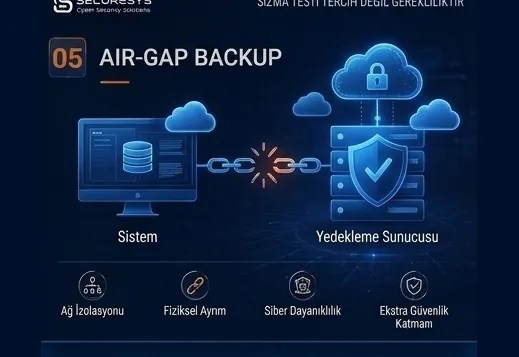
The existence of a backup system in an organization does not mean those backups cannot be reached by the attacker.
In modern ransomware attacks especially, one of the most critical targets is the backup infrastructure.
After entering the production environment, the attacker;
Active Directory,
backup servers,
storage systems,
hypervisor infrastructure,
administrator accounts,
cloud backup accounts
may try to discover systems such as these.
If the backup environment sits inside the same security boundary as the production network, the attacker can reach the backups as well.
For this reason one of the most important principles of modern backup security is this:
There must be security isolation between backup and production.
One of the strongest methods of this isolation is the:
Air-Gap Backup
approach.
Air gap means separating the backups from production systems physically or logically.
The core aim is quite clear:
Even if the attacker completely seizes the production environment, they must not be able to reach critical backup copies directly.
What Is Air-Gap Backup?
Air-Gap Backup is the method of storing backup copies isolated from the production network.
“Air gap” literally means the existence of a physical gap between two systems.
In the classic sense, an air-gapped system has no continuously active network connection between the two environments.
For example:
the backup is written onto tape,
the operation completes,
the tape is removed from the device,
it is stored in a secure physical location.
In this case the attacker cannot reach the backup data inside the tape over the network.
This method is called Physical Air-Gap.
However, in modern data centres, separating the backup infrastructure entirely in physical terms is not always practical.
For this reason the:
Logical Air-Gap
approach was developed.
Why Is Air Gap Important Against Ransomware?
The core purpose of ransomware operations is not merely to encrypt files.
The attacker also wants to eliminate the organization's recovery options.
Because if the organization can come back from backup within a few hours, the likelihood of paying the ransom drops.
For this reason, before the attack, attackers may try to identify:
the backup product,
the backup server,
repository addresses,
administrator accounts,
snapshot systems,
DR locations
as their reconnaissance targets.
Then they;
can delete backup jobs,
can change retention policies,
can remove snapshots,
can encrypt repositories,
can compromise backup credentials.
If the critical backup copy is air-gapped, reaching that copy becomes far harder for the attacker.
What Is Physical Air-Gap?
Physical Air-Gap is the physical separation of the backup media from the production environment.
The most classic example is the:
Tape Backup
system.
For example, the organization takes a tape backup every night.
After the backup completes, the tape cartridge is removed from the device.
The tape is stored in a secure archive room or at a different location.
In this case the tape:
is not connected to the network,
has no IP address,
has no remote access,
needs no Active Directory account.
Consequently, even if the attacker seizes the organization's entire digital infrastructure, they cannot remotely reach a tape that has been physically removed.
Is Tape Backup Still Used?
Yes.
Although tape technology looks like an old technology, it is still used in large organizations and in environments requiring long-term archiving.
One of the important reasons for this is that it provides an air gap.
Tape can also be advantageous in cost terms at large data volumes.
It can be used particularly in;
long-term archive,
offsite backup,
ransomware recovery,
compliance retention
scenarios such as these.
What Are the Advantages of Tape Backup?
The important advantages of tape backup are as follows:
- it can provide a physical air gap,
- it can be economical at large data volumes,
- it is suitable for long-term archiving,
- it can be naturally isolated from network attacks,
- it can be used for offsite storage.
However, tape systems also have disadvantages.
What Are the Disadvantages of Tape Backup?
In tape systems;
the restore time can be longer than with disk systems,
a tape transport operation may be required,
the media inventory must be managed,
physical security must be provided,
tape cartridges must be stored under the right conditions,
the restore operation can be more complex.
For this reason tape alone is not the whole of a modern backup architecture.
It is better used as a layer of protection.
What Is Logical Air-Gap?
In modern data centres, continuous use of physical media can be operationally difficult.
For this reason Logical Air-Gap, that is, a logical isolation approach, is used.
A logical air-gapped system may physically have a network connection.
However, access is restricted severely.
For example;
the backup repository may be reachable only at certain hours,
the backup network may sit inside a separate firewall zone,
separate authentication can be used,
it can be independent of the production domain,
access can be granted only through a backup proxy,
immutable storage can be used.
This way, even if the attacker reaches the production environment, they cannot reach the backup directly.
Is Logical Air-Gap a Real Air Gap?
There are different approaches to this in the security world.
It is not as strong as a physical air gap, because there can technically be a connection between the systems.
However, a correctly designed logical air gap provides a strong cyber resilience layer for modern organizations.
Particularly when;
network segmentation,
identity separation,
MFA,
immutable storage,
minimum privilege,
time-based connectivity
are used together, reaching the backup system becomes seriously harder for the attacker.
What Is Offline Backup?
Offline Backup is a backup copy that is not reachable over the network during normal operation.
Tape is the most classic example of this.
However, removable disks or storage systems physically disconnected can also be used as offline backup.
The core advantage of offline backup is:
the absence of an attack surface over the network.
Ransomware can encrypt only the systems it can reach.
A backup with no network connection can remain directly outside the attack chain.
Is There a Difference Between Offline Backup and Air Gap?
The concepts are quite close to each other.
Offline backup expresses that the data copy is not actively connected to the network.
Air gap, on the other hand, is a broader isolation principle.
Air gap;
physical,
logical,
identity-based,
network-based
can include isolation of these kinds.
For this reason offline backup can be thought of as one application of the air-gap strategy.
The Difference Between Air Gap and Immutable Backup
Immutable backup and air-gap backup are not alternatives to each other.
Immutable Backup
The backup may be accessible but it cannot be modified.
Air-Gap Backup
The backup is isolated from the production environment.
The strongest approach is the:
Immutable + Air-Gapped Backup
combination.
This way reaching the backup is made harder for the attacker.
And even if they do reach it, deleting or modifying the backup is additionally restricted.
What Is a Cyber Recovery Vault?
One of the important concepts frequently used in modern enterprise backup architecture is the:
Cyber Recovery Vault
approach.
A Cyber Recovery Vault means holding critical backup data in a dedicated environment isolated to a high degree from the production environment.
This environment is not merely storage.
It may have its own;
identity infrastructure,
network policy,
access controls,
backup system,
monitoring mechanisms.
as separate components.
The aim is to create a trusted recovery environment after a cyber attack.
How Does a Cyber Recovery Vault Work?
Let us imagine a sample structure.
Critical systems are running in the production environment.
Backup systems copy the data regularly.
At defined times, critical backup data is transferred into the Cyber Recovery Vault.
After the transfer completes, the connection is cut or restricted.
The backup copies inside the vault are held as immutable.
Normal production administrator accounts cannot reach the vault.
In this structure, even if the attacker completely seizes the production network, the vault can remain an independent security zone.
Are a Cyber Recovery Vault and a DR Centre the Same Thing?
No.
A Disaster Recovery centre essentially aims to run systems at a second location.
A Cyber Recovery Vault, on the other hand, aims to protect trusted backup copies from attackers.
The DR environment may replicate continuously with production.
In that case ransomware can replicate the encrypted data into the DR environment too.
A Cyber Recovery Vault, by contrast, can use more controlled and isolated data transfer.
Consequently:
DR = fast operational continuity
Cyber Recovery Vault = trusted clean recovery point
is how they can be thought of.
In the most mature structures the two are used together.
Why Is Replication Not an Air Gap?
Replication systems require a continuous connection.
For example:
Datacenter A → Datacenter B
if there is continuous data replication between them, the two systems are connected to each other.
This is valuable for high availability.
However, if ransomware encrypts the production data, the encrypted blocks can be replicated into the DR environment as well.
For this reason:
Replication ≠ Backup
and
Replication ≠ Air-Gap
Replication provides high availability.
Air gap, on the other hand, provides attack isolation.
Does a Snapshot Provide an Air Gap?
Generally no.
A snapshot is a fast restore point residing inside the storage system.
If the attacker holds storage administrator privileges, they can delete the snapshots.
If the storage is lost entirely, the snapshots can be lost with it.
For this reason a snapshot:
is powerful for fast recovery,
but is not an independent air gap.
Why Must the Backup Network Be Separated?
One of the most important parts of the air-gap strategy is network isolation.
Backup traffic can be kept separate from the production network.
For example:
Production VLAN
Management VLAN
Backup VLAN
Cyber Recovery VLAN
separate segments along these lines can be used.
Only the necessary communication is permitted through the firewall.
This approach makes it harder for the attacker to perform lateral movement to the backup servers over the production network.
What Should the Backup Firewall Rules Look Like?
“Any-any” firewall rules for the backup system create serious risk.
Instead:
source IP,
destination IP,
port,
protocol,
connection direction
minimum access must be applied on this basis.
For example, a production server can communicate only with the backup proxy over a specific port.
The backup repository, meanwhile, may not communicate directly with production servers.
This design reduces the attack surface.
Should the Backup Server Have Internet Access?
Direct and uncontrolled internet access for backup servers is not recommended.
Internet access must be opened only for genuinely necessary services.
For example;
update,
license verification,
cloud backup transfer
if needs such as these exist, a proxy or an allow-list can be used.
This way the attack surface of the backup system is reduced.
From Where Should the Backup Management Interface Be Reached?
Access to the backup management console must not be granted from the normal user network.
Management access can be provided through a separate:
management VLAN,
jump server,
Privileged Access Workstation,
PAM gateway
as the entry path.
The aim is to protect administrator credentials from phishing and malware risk.
Should the Backup Environment Be Separated from the Production Domain?
On critical systems this must be strongly evaluated.
If the backup server and repository are joined to the production Active Directory domain, the attacker can move into the backup environment once they obtain Domain Admin privileges.
For this reason;
standalone authentication,
a separate backup domain,
local hardened accounts,
PAM
methods such as these can be used.
The core principle is this:
Losing the production identity infrastructure must not mean losing the backup identity infrastructure as well.
Why Is a Separate Identity Infrastructure Important?
Not using production AD accounts inside the Cyber Recovery Vault is an important security principle.
For example, the attacker may have:
company.local
completely seized that domain.
If the vault too is managed with company.local accounts, the attacker can reach the vault.
If a separate identity infrastructure is used instead, the attacker has to obtain credentials all over again.
This shrinks the blast radius of the attack significantly.
Where Should Backup Credentials Be Kept?
The service accounts used in backup systems are critical credentials.
Keeping these credentials;
inside a script,
in a plain text file,
inside a shared folder,
on the admin's desktop
is risky.
Instead:
PAM,
credential vault,
secret management
secure mechanisms such as these can be used.
Is MFA Enough for an Air Gap?
No.
MFA is an important security layer but it is not an air gap.
MFA makes the attacker's login harder.
Air gap, on the other hand, limits the access path between systems.
The best approach is:
MFA + Network Isolation + Identity Separation + Immutable Backup
using these together.
What Is Time-Based Air Gap?
In some modern backup systems, connections are opened only at certain times.
For example:
Every night at 02:00
the backup copy connection is opened.
At 03:00 the transfer completes.
The connection is closed.
For the rest of the day the vault remains unreachable from the production network.
This approach seriously reduces the attacker's window of opportunity.
This method can be thought of as:
Time-Based Air-Gap
in conceptual terms.
Can One-Way Data Transfer Be Used?
In environments requiring high security, a data diode or one-way data transfer systems can be used.
In this architecture data flows only in the:
Production → Backup
direction.
Direct communication from the backup environment to production is not possible.
This way the attacker is made less able to move from the backup environment to production systems or in the reverse direction.
Structures of this kind can be evaluated particularly in critical infrastructure.
Is Air-Gap Backup Possible in the Cloud?
Creating a true air gap in physical terms in a cloud environment can be difficult.
However, a logical air gap can be applied.
For example:
a separate cloud account,
immutable object storage,
restricted IAM,
object lock,
network isolation,
private endpoint,
a separate encryption key,
time-based access
can be used.
This structure can form a security boundary independent of the production cloud environment.
Why Is a Separate Cloud Account Important?
If production and backup reside inside the same cloud account, compromise of the administrator account can put both environments at risk.
For this reason;
Production Account
and
Backup Account
can be kept apart.
Access to the backup account must not be provided with production account credentials.
This method reduces the attacker's blast radius.
Is Offsite Backup an Air Gap?
Not always.
The backup may be in a different city, but if it is continuously connected over the network it does not provide a real air gap.
For example, there may be a permanent VPN connection from the Ankara production system to the Istanbul backup centre.
If the attacker can move from the Ankara network into the Istanbul environment over this VPN, geographical distance does not provide isolation against the cyber attack.
For this reason:
Offsite ≠ Air-Gap
although the two can be used together.
How Should the Air-Gap Backup Retention Period Be Determined?
How long air-gapped backups will be kept must be determined according to business need.
For example:
daily copies for 30 days,
weekly copies for 12 weeks,
monthly copies for 12 months
can be retained.
However, there is no single universal retention period.
In ransomware attacks especially, the fact that the attacker may remain undetected inside the system for a long time must be taken into account.
Very short retention periods can make finding a clean restore point difficult.
Does Air-Gapped Backup Mean the Backup Is Clean?
No.
This is an extremely critical point.
A backup may be isolated from the attacker.
But malware may have been present on the production system at the moment the backup was taken.
For example, suppose the attacker entered the system on 1 April.
Suppose the ransomware was executed on 20 April.
The offline tape taken on 15 April is technically safe.
But the attacker's backdoor may be present inside the tape.
Consequently:
Isolated Backup ≠ Clean Backup
A clean restore point must be determined before recovery.
Why Is Clean Room Recovery Used Together with Air Gap?
Restoring the backup directly into the old production environment after a cyber attack is risky.
Because in the production environment;
compromised accounts,
malware,
backdoors,
faulty firewall rules,
compromised administrator systems
may remain.
For this reason an isolated:
Clean Room
environment can be created.
The backup is restored there first.
A malware scan is performed.
IOC checks are carried out.
Applications are tested.
The identity infrastructure is verified.
The system is then moved into production in a controlled manner.
What Should Be Inside a Recovery Vault?
In a mature Cyber Recovery Vault structure there must not be backup files alone.
In addition;
the backup software,
critical license information,
network configurations,
firewall config backups,
DNS configurations,
Active Directory recovery material,
encryption key backups,
application installation files,
recovery procedures,
communication plans
can also be considered.
Because a large cyber attack does not affect data files alone.
The entire infrastructure may need to be rebuilt.
Why Is Air Gap Critical for Active Directory?
Active Directory is the organization's identity backbone.
If AD is completely seized, the attacker;
user accounts,
service accounts,
Group Policy,
administrator privileges
can gain control over these.
For this reason the backup and forest recovery material used for AD recovery must be protected specifically.
Critical recovery passwords and documents can also be kept in a secure offline environment.
Should Network Configurations Be Backed Up Too?
Yes.
During disaster recovery, server backups alone may not be sufficient.
For example;
firewall,
core switch,
router,
load balancer,
VPN,
WAF
configurations can be lost as well.
Config backups of these devices must be taken regularly and their critical copies kept in an isolated environment.
Otherwise, even if the data is restored, the network infrastructure may not be rebuildable.
Should Backup Catalog Information Be Protected Too?
Yes.
Backup systems most often track which file is inside which backup through a catalog or metadata system.
If this catalog is lost, restore operations can become seriously difficult.
For this reason the backup software's;
configuration backup,
catalog backup,
metadata backup
processes must be protected as well.
Should Encryption Keys Be Stored in an Air-Gapped Environment?
Having second copies of critical encryption keys in a secure offline or independent environment is important.
Because even if the backup files are intact, a restore may not be possible if the encryption key has been lost.
This can be a critical problem in real disaster scenarios.
Key management must be designed as a separate part of the backup strategy.
Should Air-Gap Backup Be Tested?
Absolutely.
Saying “we have tape” or “we have a backup vault” is not enough.
A real test must be performed.
For example:
the production system is assumed to be down,
network access is cut,
the air-gapped backup is located,
the backup catalog is loaded,
the critical system is restored,
the application is started,
the RTO is measured.
This way real recovery capacity is verified.
Is Keeping the Tape in a Safe Enough?
No.
The tape being physically secure is important, but operational management is also necessary.
The following subjects must be tracked:
the media label,
which backup it contains,
the retention date,
at which location it resides,
by whom it was received,
when it will be destroyed.
This process is called media management.
Physical Security of Backup Media
Offline backups can be physically stolen.
For this reason tapes or removable disks:
must be encrypted,
must be stored in a locked area,
access logs must be kept,
authorized personnel must be limited
and secure transport must be used when required.
Because a physically stolen unencrypted backup can cause a serious data breach.
What Should Be Watched in Offsite Tape Transport?
If the tape is being transported to a different location, a chain of custody can be established.
Who handed it over?
Who received it?
On which date?
Which media?
To which location?
These records matter particularly in backup environments containing sensitive data.
The Relationship Between Air-Gap Backup and 3-2-1-1-0
The second “1” in the 3-2-1-1-0 backup model is generally interpreted as:
an offline, air-gapped or immutable copy
in practical terms.
For this reason air gap is one of the fundamental elements of the modern 3-2-1-1-0 strategy.
Sample structure:
3 copies of the data
2 different storage types
1 offsite
1 immutable or air-gapped
0 verification errors
This model increases ransomware resilience significantly.
The Most Common Mistakes in Air-Gap Backup
The mistakes frequently seen in organizations are as follows:
- mistaking offsite backup for an air gap,
- treating a permanently open VPN connection as isolation,
- including the backup vault in the production domain,
- using the same administrator credentials,
- not using MFA,
- setting the immutable retention far too short,
- not encrypting offline backups,
- not performing restore tests,
- not protecting backup catalogs,
- not backing up encryption keys,
- not preparing a clean recovery scenario.
These mistakes can reduce the effectiveness of the air-gap strategy.
How Is a Cyber Recovery Exercise Performed?
In a realistic exercise the organization can proceed on this assumption:
“The production environment has been lost entirely.”
In that case the team must bring the system back up using only the protected backup copies.
In the exercise;
backup access,
identity infrastructure recovery,
network recovery,
database restore,
application restore,
security controls,
user access
are tested.
As a result of the exercise the real RTO and RPO values are measured.
Why Is Air-Gap Backup Important for Business Continuity?
From a business continuity perspective the core goal is not merely to prevent data loss.
The organization must be able to restart its critical activities.
Air-gapped backup supports the protection of critical data even in the worst scenario.
For this reason it is directly related to;
Disaster Recovery,
Business Continuity,
Cyber Resilience
strategies of these kinds.
Air-Gap Backup from an ISO 27001 Perspective
Within the scope of ISO/IEC 27001, the availability and integrity of information assets and secure backup processes are important.
Air gap must not be regarded as the single mandatory method for every organization.
However, if the risk analysis performed shows the risk of ransomware and backup sabotage to be high, air gap can be an effective risk reduction control.
Air-Gap Backup from an ISO 22301 Perspective
From a business continuity perspective, ISO 22301 aims at continuing critical processes after an interruption.
Air-gapped backup can provide a trusted recovery source particularly in large-scale;
ransomware,
data center failure,
storage corruption
scenarios such as these.
However, backup is only a technical part of the Business Continuity Plan.
DORA and the Cyber Resilience Perspective
In financial institutions the digital operational resilience approach focuses not only on blocking the attack but on the organization's ability to sustain its operations after an attack.
For this reason;
isolated backup,
restore testing,
DR,
incident response,
resilience testing
must be addressed together.
Air gap is one of the important parts of this holistic resilience model.
The Critical Question: What Will We Do If Production Is Lost Entirely?
The simplest way to evaluate an air-gap architecture is to ask this question:
“If all the servers, storage, AD accounts and backup administrators in the production environment are lost, from which copy will we come back?”
If there is no clear answer to this question, there is serious risk from a business continuity perspective.
The second question:
“Do we need a system in the production environment in order to reach this backup?”
If the answer is yes, the real isolation may be insufficient.
The third question:
“Have we genuinely tested that this backup restores?”
These questions reveal whether the air-gap strategy works only on paper or in the real sense.
Conclusion: The Safest Backup Is the One the Attacker Cannot Reach
In modern cyber attacks the backup infrastructure is no longer a technical system running in the background.
It is a direct attack target.
For this reason the core principle of modern backup architecture is:
Production systems and recovery systems must not reside within the same security boundary.
Air-Gap Backup is one of the strongest applications of this principle.
A physical air gap;
tape,
offline media
can be provided by methods such as these.
A logical air gap, meanwhile;
network segmentation,
a separate identity infrastructure,
immutable storage,
Cyber Recovery Vault,
time-based access,
a separate cloud account
can be created with controls such as these.
In the strongest structures;
Air-Gap + Immutable Backup + Offsite Backup + Encryption + MFA + Identity Separation + Restore Testing
are applied together.
Because in a real ransomware attack the aim is not merely to bring back the production data.
The aim is:
to return safely from a copy the attacker could not reach, could not modify and that has been verified as clean.
For this reason one of the fundamental principles of modern cyber resilience can be summarized in this sentence:
Assume your production environment can be lost; design your recovery environment accordingly.
Related Articles
Backup & Business Continuity
What Is Backup? Why Is It Critical for Organisations?
What is backup and why is it critical for organisations? How it differs from RAID and snapshots, why ransomware targets backups, RPO/RTO and restore testing.
The 3-2-1 Backup Rule and Modern Backup Strategies
What is the 3-2-1 backup rule? The 3-2-1-1-0 model, immutable and air-gap backup, identity isolation and restore testing in modern backup strategy.
Full, Incremental and Differential Backup: Which One, When?
What is the difference between full, incremental and differential backup? How synthetic full, incremental forever, CBT and chain management affect RPO/RTO.
What Is Immutable Backup? Unchangeable Backups Against Ransomware
What is immutable backup, how do WORM and Object Lock work, and how is an unchangeable backup architecture built against ransomware? A full guide.
Backup in Ransomware Attacks: How Do Attackers Target Backups?
How are backups targeted in ransomware attacks? The attack chain, backup discovery, retention sabotage and choosing a clean restore point.
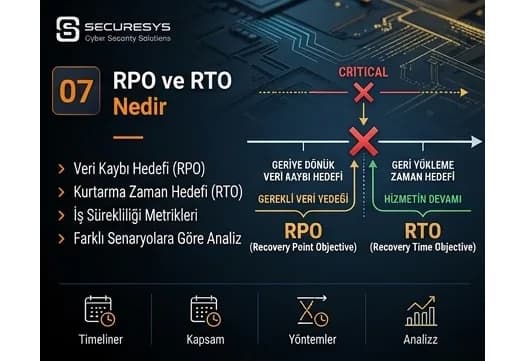
What Are RPO and RTO? The Two Critical Metrics of Business Continuity
What are RPO and RTO and how are they set? BIA, tier classification, MTD, dependency mapping and real recovery targets in a ransomware scenario.
Looking for professional support on this topic?
Our expert team will reach out for a free consultation as soon as possible.